Trace Google Agent Development Kit (ADK) agent and tool calls in Weave using OpenTelemetry
You can trace Google Agent Development Kit (ADK) agent and tool calls in Weave using OpenTelemetry (OTEL). ADK is a flexible and modular framework for developing and deploying AI agents. While optimized for Gemini and the Google ecosystem, ADK is model-agnostic and deployment-agnostic. It provides tools for creating, deploying, and orchestrating agentic architectures ranging from simple tasks to complex workflows.This guide explains how to trace ADK agent and tool calls using OTEL, and visualize those traces in Weave. You’ll learn how to install the required dependencies, configure an OTEL tracer to send data to Weave, and instrument your ADK agents and tools.
It is recommended that you store sensitive environment variables like your API key and project info in an environment file (e.g., .env), and load them using os.environ. This keeps your credentials secure and out of your codebase.
The following code snippet demonstrates how to configure an OTLP span exporter and tracer provider to send OTEL traces from an ADK application to Weave.
To ensure that Weave traces ADK properly, set the global tracer provider before using ADK components in your code.
import base64import osfrom opentelemetry.exporter.otlp.proto.http.trace_exporter import OTLPSpanExporterfrom opentelemetry.sdk import trace as trace_sdkfrom opentelemetry.sdk.trace.export import SimpleSpanProcessorfrom opentelemetry import trace# Load sensitive values from environment variablesWANDB_BASE_URL = "https://trace.wandb.ai"# Your W&B entity/project name e.g. "myteam/myproject"PROJECT_ID = os.environ.get("WANDB_PROJECT_ID") # Your W&B API key (found at https://wandb.ai/authorize)WANDB_API_KEY = os.environ.get("WANDB_API_KEY") OTEL_EXPORTER_OTLP_ENDPOINT = f"{WANDB_BASE_URL}/otel/v1/traces"AUTH = base64.b64encode(f"api:{WANDB_API_KEY}".encode()).decode()OTEL_EXPORTER_OTLP_HEADERS = { "Authorization": f"Basic {AUTH}", "project_id": PROJECT_ID,}# Create the OTLP span exporter with endpoint and headersexporter = OTLPSpanExporter( endpoint=OTEL_EXPORTER_OTLP_ENDPOINT, headers=OTEL_EXPORTER_OTLP_HEADERS,)# Create a tracer provider and add the exportertracer_provider = trace_sdk.TracerProvider()tracer_provider.add_span_processor(SimpleSpanProcessor(exporter))# Set the global tracer provider BEFORE importing/using ADKtrace.set_tracer_provider(tracer_provider)
After setting up the tracer provider, you can create and run ADK agents with automatic tracing. The following example demonstrates how to create a simple LLM agent with a tool, and run it with an in-memory runner:
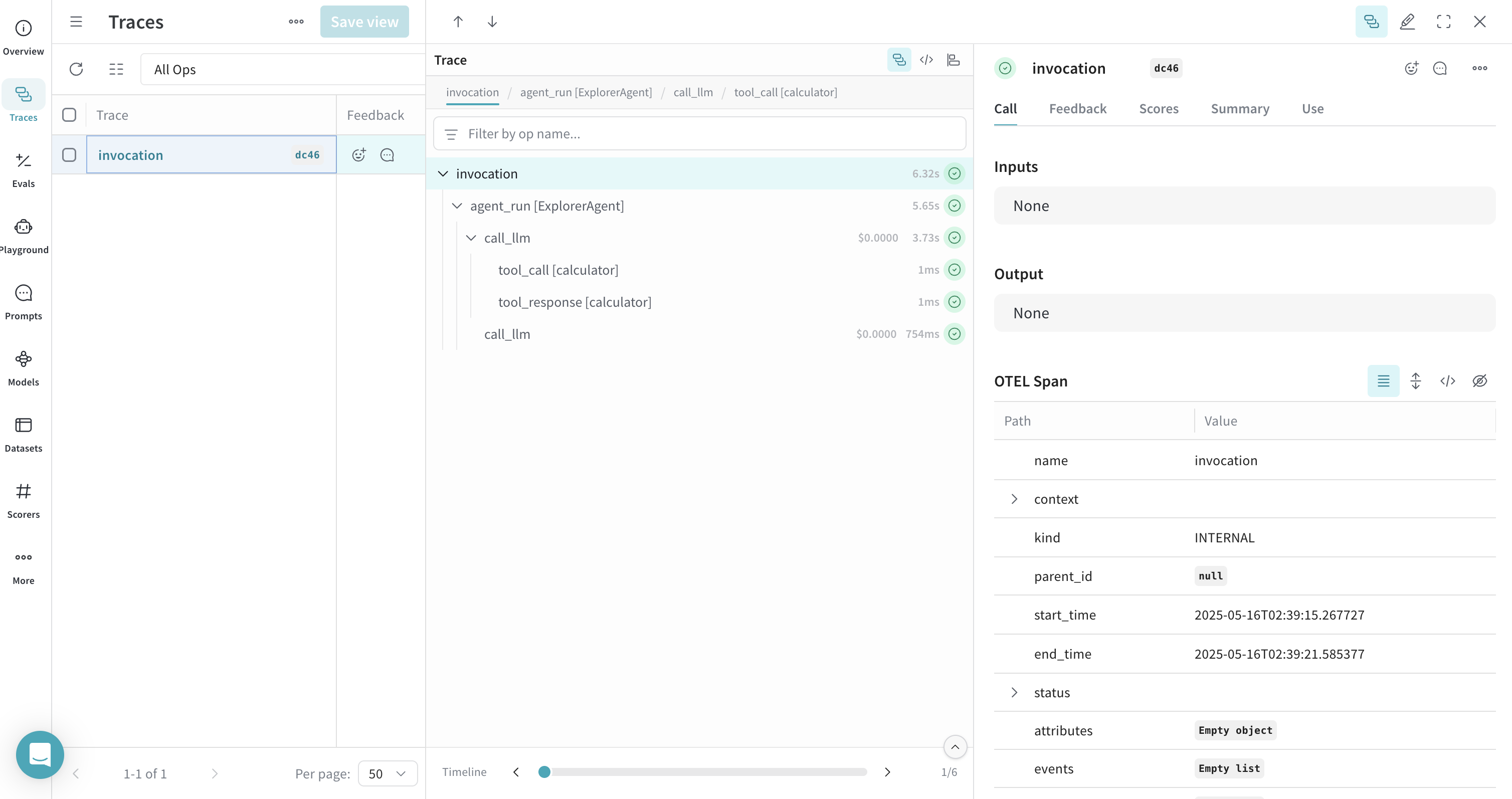
from google.adk.agents import LlmAgentfrom google.adk.runners import InMemoryRunnerfrom google.adk.tools import FunctionToolfrom google.genai import typesimport asyncio# Define a simple tool for demonstrationdef calculator(a: float, b: float) -> str: """Add two numbers and return the result. Args: a: First number b: Second number Returns: The sum of a and b """ return str(a + b)calculator_tool = FunctionTool(func=calculator)async def run_agent(): # Create an LLM agent agent = LlmAgent( name="MathAgent", model="gemini-2.0-flash", # You can change this to another model if needed instruction=( "You are a helpful assistant that can do math. " "When asked a math problem, use the calculator tool to solve it." ), tools=[calculator_tool], ) # Set up runner runner = InMemoryRunner(agent=agent, app_name="math_assistant") session_service = runner.session_service # Create a session user_id = "example_user" session_id = "example_session" session_service.create_session( app_name="math_assistant", user_id=user_id, session_id=session_id, ) # Run the agent with a message that should trigger tool use async for event in runner.run_async( user_id=user_id, session_id=session_id, new_message=types.Content( role="user", parts=[types.Part(text="What is 5 + 7?")] ), ): if event.is_final_response() and event.content: print(f"Final response: {event.content.parts[0].text.strip()}")# Run the async functionasyncio.run(run_agent())
All agent operations are automatically traced and sent to Weave, allowing you to visualize the execution flow. You can view model calls, reasoning steps, and tool invocations.
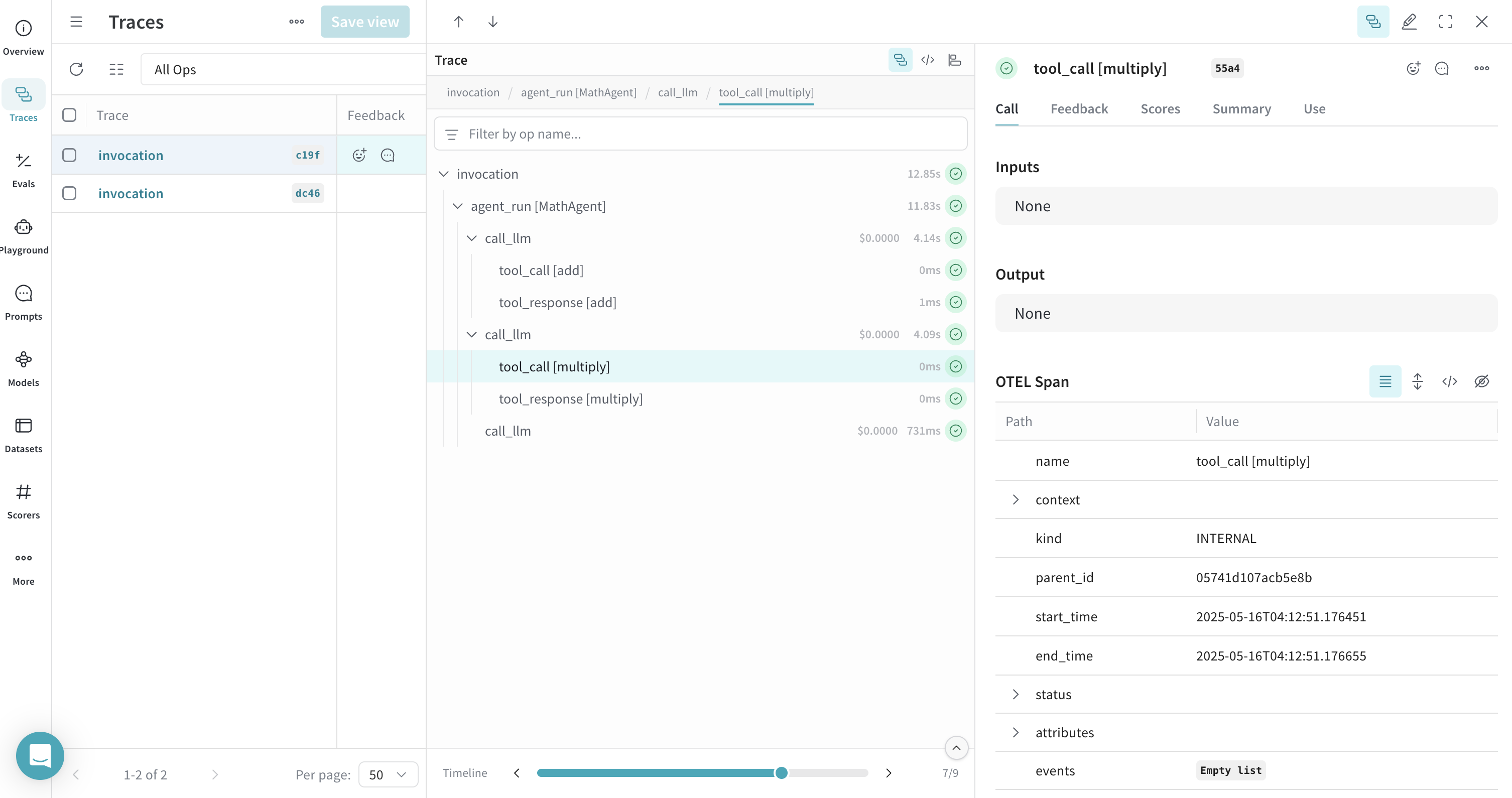
When you define and use tools with ADK, these tool calls are also captured in the trace. The OTEL integration automatically instruments both the agent’s reasoning process and the individual tool executions, providing a comprehensive view of your agent’s behavior.Here’s an example with multiple tools:
from google.adk.agents import LlmAgentfrom google.adk.runners import InMemoryRunnerfrom google.adk.tools import FunctionToolfrom google.genai import typesimport asyncio# Define multiple toolsdef add(a: float, b: float) -> str: """Add two numbers. Args: a: First number b: Second number Returns: The sum of a and b """ return str(a + b)def multiply(a: float, b: float) -> str: """Multiply two numbers. Args: a: First number b: Second number Returns: The product of a and b """ return str(a * b)# Create function toolsadd_tool = FunctionTool(func=add)multiply_tool = FunctionTool(func=multiply)async def run_agent(): # Create an LLM agent with multiple tools agent = LlmAgent( name="MathAgent", model="gemini-2.0-flash", instruction=( "You are a helpful assistant that can do math operations. " "When asked to add numbers, use the add tool. " "When asked to multiply numbers, use the multiply tool." ), tools=[add_tool, multiply_tool], ) # Set up runner runner = InMemoryRunner(agent=agent, app_name="math_assistant") session_service = runner.session_service # Create a session user_id = "example_user" session_id = "example_session" session_service.create_session( app_name="math_assistant", user_id=user_id, session_id=session_id, ) # Run the agent with a message that should trigger tool use async for event in runner.run_async( user_id=user_id, session_id=session_id, new_message=types.Content( role="user", parts=[types.Part(text="First add 5 and 7, then multiply the result by 2.")] ), ): if event.is_final_response() and event.content: print(f"Final response: {event.content.parts[0].text.strip()}")# Run the async functionasyncio.run(run_agent())
ADK provides various workflow agents for more complex scenarios. You can trace workflow agents just like regular LLM agents. Here’s an example using a SequentialAgent:
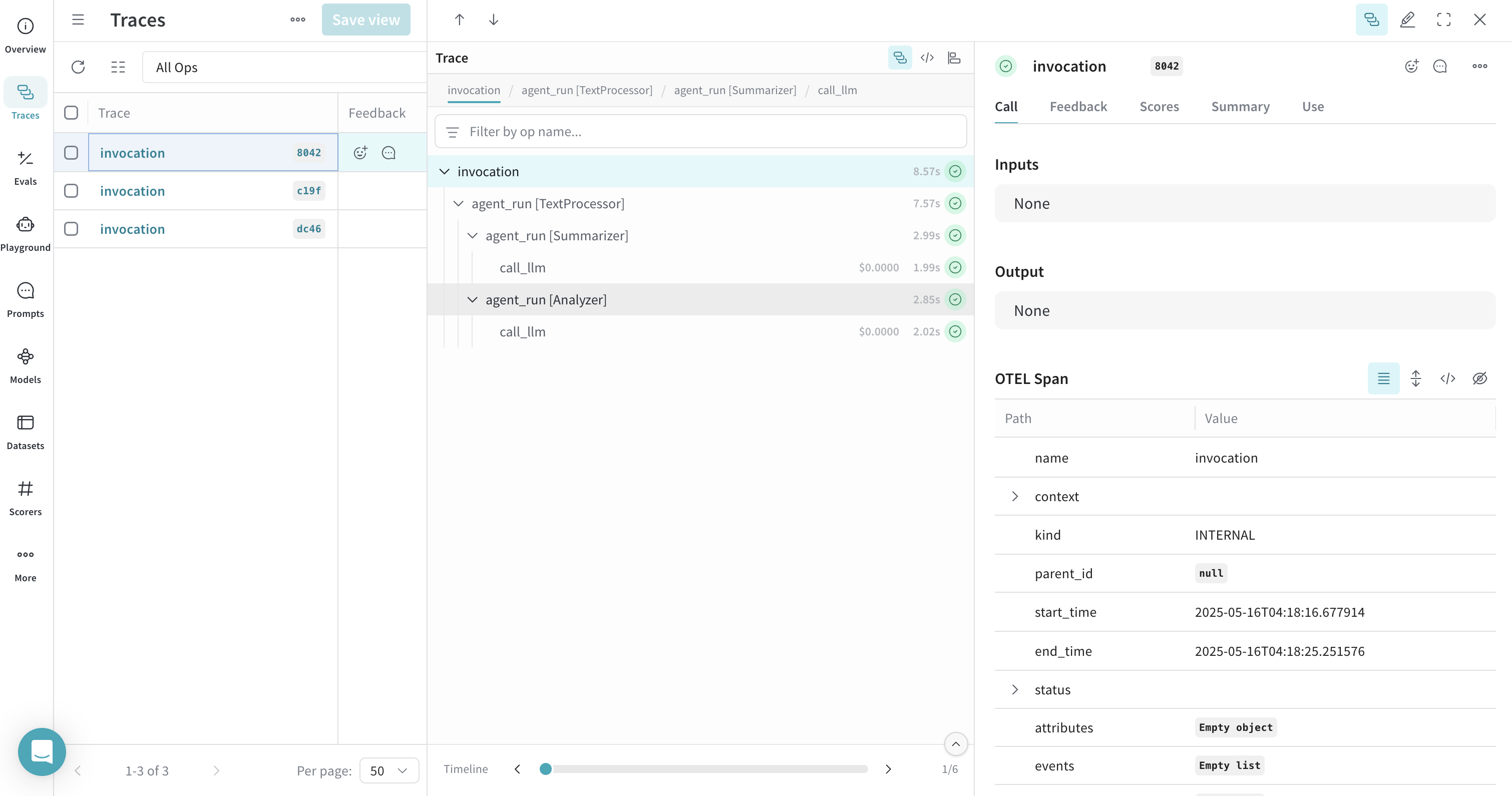
from google.adk.agents import LlmAgent, SequentialAgentfrom google.adk.runners import InMemoryRunnerfrom google.genai import typesimport asyncioasync def run_workflow(): # Create two LLM agents summarizer = LlmAgent( name="Summarizer", model="gemini-2.0-flash", instruction="Summarize the given text in one sentence.", description="Summarizes text in one sentence", output_key="summary" # Store output in state['summary'] ) analyzer = LlmAgent( name="Analyzer", model="gemini-2.0-flash", instruction="Analyze the sentiment of the given text as positive, negative, or neutral. The text to analyze: {summary}", description="Analyzes sentiment of text", output_key="sentiment" # Store output in state['sentiment'] ) # Create a sequential workflow workflow = SequentialAgent( name="TextProcessor", sub_agents=[summarizer, analyzer], description="Executes a sequence of summarization followed by sentiment analysis.", ) # Set up runner runner = InMemoryRunner(agent=workflow, app_name="text_processor") session_service = runner.session_service # Create a session user_id = "example_user" session_id = "example_session" session_service.create_session( app_name="text_processor", user_id=user_id, session_id=session_id, ) # Run the workflow async for event in runner.run_async( user_id=user_id, session_id=session_id, new_message=types.Content( role="user", parts=[types.Part(text="The product exceeded my expectations. It worked perfectly right out of the box, and the customer service was excellent when I had questions about setup.")] ), ): if event.is_final_response() and event.content: print(f"Final response: {event.content.parts[0].text.strip()}")# Run the async functionasyncio.run(run_workflow())
This workflow agent trace will show the sequential execution of both agents in Weave, providing visibility into how data flows through your multi-agent system.